The shared GTD app for two
The shared list always ends up being one person’s job. Not here.
Every couple’s to-do list lives in someone’s head, until it falls on them again. DuetFlow gives both of you one shared flow where every task is clearly one of us, both of us, or just mine. So it’s not all on one person anymore, and “I thought you were handling that” stops being a thing.
For the one who runs the system
Keep the airtight setup you already trust: Inbox, Today, Waiting For, sequential projects. The household finally has a home in it, with a private side your partner can’t see.
I keep my system.For the one who just wants it handled
No system to learn, no app to babysit. The mental load of remembering every errand, chore, and appointment for both of you stops being yours to carry. You just see what’s yours, and it gets done.
The mental load lifts.The whole household in one app you both actually use.
Get DuetFlow29.99 € once, for both of you, on every Mac, iPhone, and iPad. No subscription, ever. No account, no server: your private tasks stay yours.
The real split
One of you runs a system. The other just wants it handled.
Most couples aren’t two organized people. They’re one person with a system, and one person outside it.
You’ve tried the shared list. For a week it works. Then it quietly becomes one person’s job to keep it current, and the other person stops opening it. Now the real coordination layer is texts, sticky notes, verbal agreements, and optimistic assumptions. The whole household runs on one person’s memory.
So the load splits the wrong way. The partner with the system ends up tracking everything that touches both of you, on top of their own. The partner without one lies awake running tomorrow’s list (groceries, the pickup, did anyone reorder the thing) because the only place it actually lives is their head. Nobody clearly owns anything, so it gets done twice or not at all.
The mechanic
Two of you in one flow, and everything in it knows who it belongs to.
Every task is one of us, both of us, or just mine, and your private side stays private.
This is the part a shared list can’t do. In DuetFlow, every task carries who it’s for:
- One of us: either partner can take it; first to do it, done. (The grocery run, the call to the plumber, whoever gets to it.)
- Both of us: each of you has your own to do. (You both RSVP, you both pack.)
- Just one of you: clearly owned, clearly visible to both, so it stops being a question.
And next to all of that, a private side. Your work tasks, your personal projects, the surprise you’re planning: they live in your space, and your partner never sees them. Make a task private and it leaves the shared household entirely; make it shared and it shows up for both of you. Same app, one flow, no second tool for “the couple stuff.”
No accounts to create for your partner, no company server in the middle. Just the two of you.
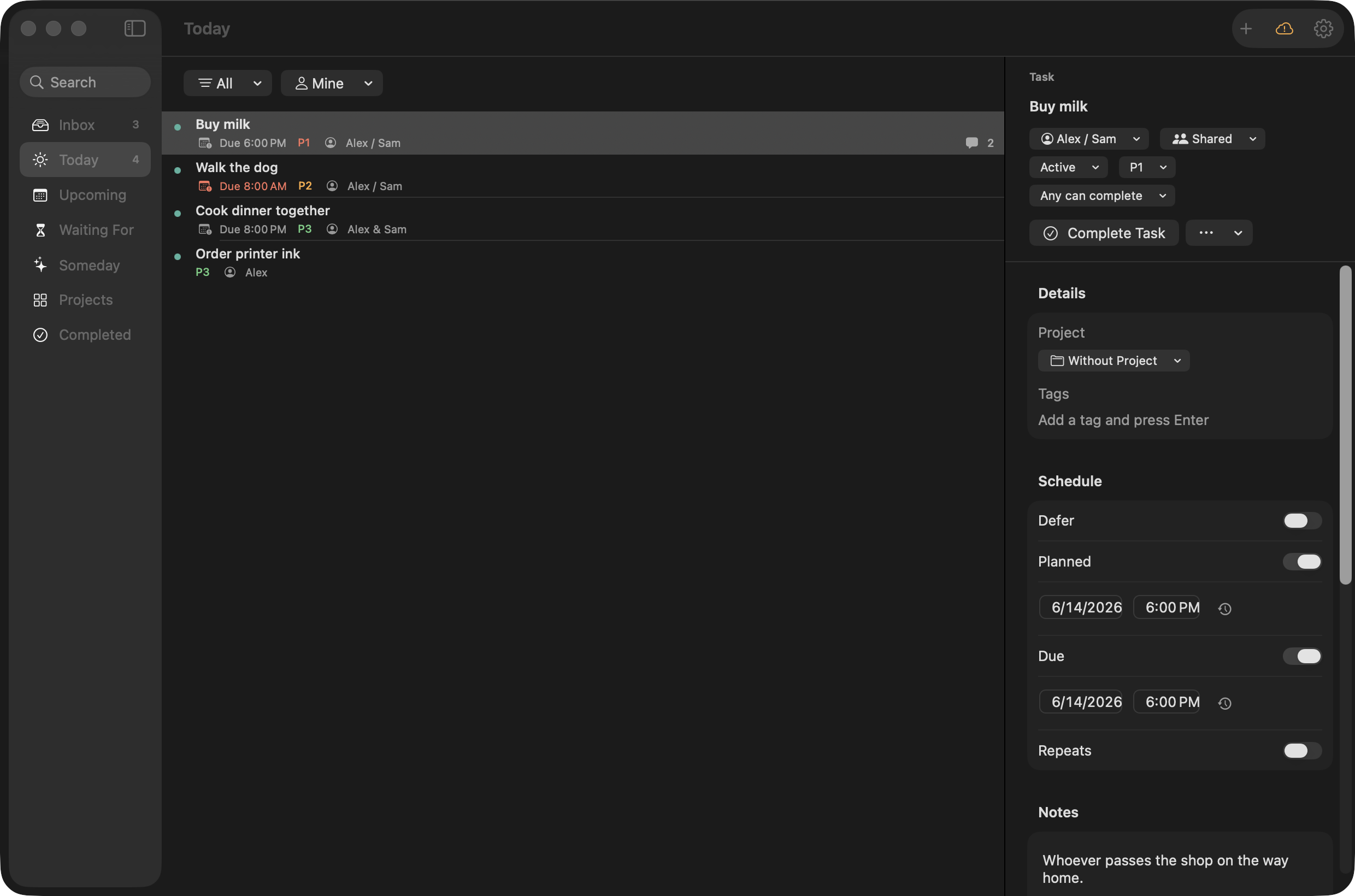
macOS — one shared task, owned by either of you
For the operator
Keep your airtight system. Finally fit your partner inside it.
A real GTD engine, with Inbox triage, Today, Upcoming, Waiting For, and sequential projects. Not a chore list with a couples skin.
You didn’t spend years tuning a trusted system to trade it for a cute shared to-do app. So DuetFlow gives you the depth you’d never give up:
- Inbox triage that won’t let a task escape half-baked: a shared task can’t leave your Inbox until someone actually owns it, so nothing drifts into the void unassigned.
- Today that’s actually today: defer dates, due dates, planned dates, and always-available work computed into one honest list, with anything blocked or waiting kept out.
- Upcoming as a 30-day rolling view, Waiting For grouped by who you’re waiting on, Someday for the maybe-laters.
- Sequential projects that block themselves: the next step doesn’t surface until the one before it is done, so a multi-step project stays a chain, not a pile.
- Project-inherited metadata and recurrence, so you set it once and the system carries it.
You keep all that power, and the household finally gets a home inside the same system, with a private side your partner can’t see, so your work and personal projects stay yours.
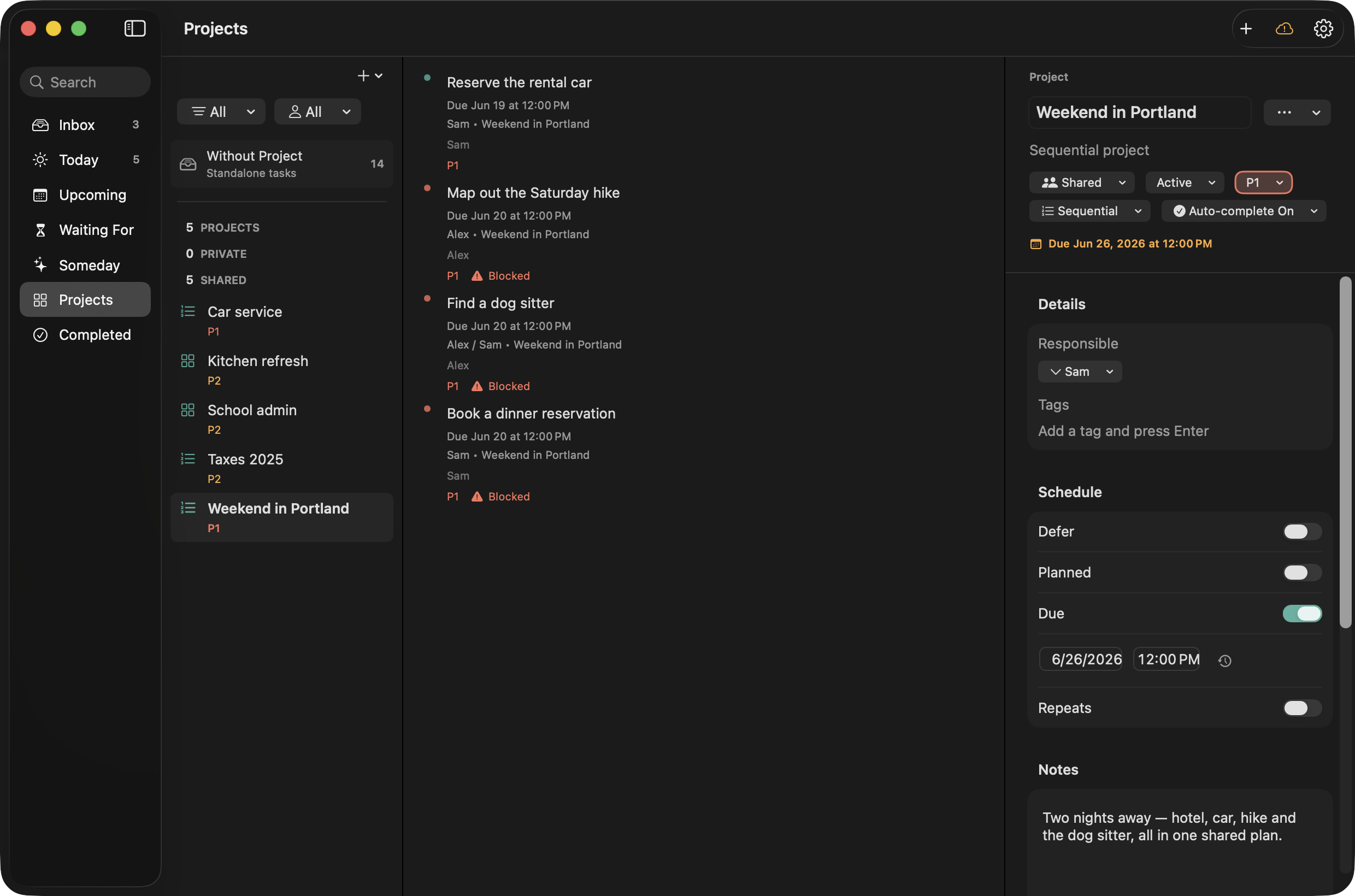
macOS — the next step stays locked until the one before it is done
For the partner
Nothing to learn. You just see what’s yours.
No system, no setup, no app to babysit. Open it, see your stuff, done.
You didn’t ask for a productivity system, and you’re not getting one. Your side of DuetFlow is the opposite of homework: a short, calm list of what’s actually yours, in plain language, with nothing to configure.
- See only what’s yours. Flip one filter to “Mine” and the household noise disappears: just your tasks, nothing to wade through.
- Things get handed to you cleanly. When something’s yours, it’s clearly yours, not a vague “can you maybe handle this?” you have to remember on top of everything else.
- No nagging required. Because the app knows who owns what, you stop being the one who chases, reminds, and asks “did you do it yet?”
- Your private stuff is yours. Anything you mark private, your partner can’t see, not even that it exists.
This is the part that actually takes weight off your plate: it gets out of your head and into something both of you can see, so you can finally stop being the household’s memory.
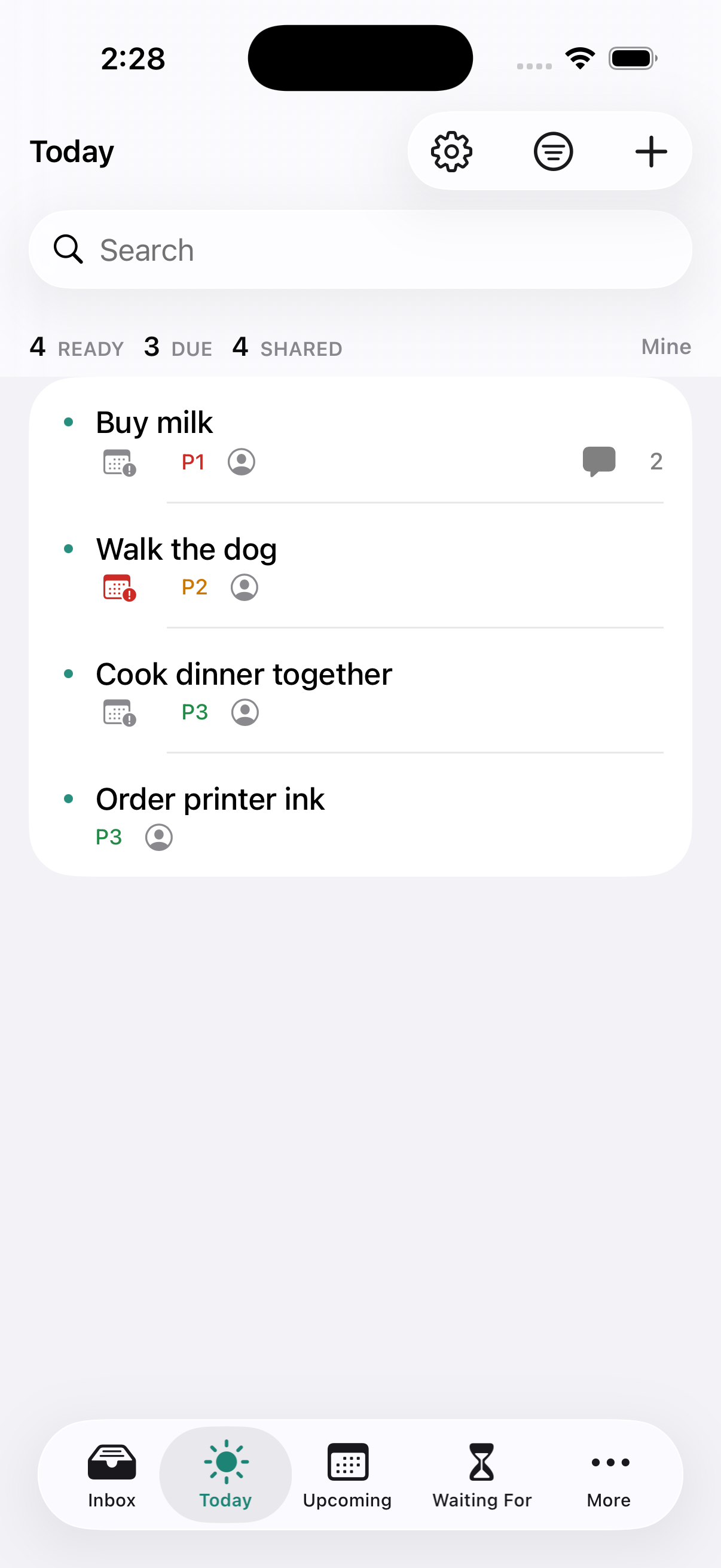
iPhone — flip to Mine and only your own tasks remain
Why it exists
Built by a household that needed it. Used by that household every day.
DuetFlow runs our own actual life: one of us runs the system, one of us just wants it handled.
DuetFlow didn’t come from a market study. We built it because our own household had exactly this split: one of us lived in a serious GTD setup and tracked everything that touched both of us; the other never wanted a system and just wanted their part handled. Every shared-list fix we tried died the same way: one of us stopped opening it.
So we built the thing that actually works for two asymmetric people, and we’ve run our real household in it ever since: the groceries, the appointments, the projects, the private work each of us keeps to ourselves. The “one of us / both of us” model, the private side, the calm partner view: we run all of it on ourselves every day. It’s how we get through a week.
When something doesn’t survive a week in our own household, we cut it before it ever reaches you.

The two of us — the household DuetFlow runs every day.
Private by architecture
Private actually means private, because of how it’s built.
No server. No account beyond the Apple IDs you both already have. Apple’s privacy label says “no data collected,” because there’s nothing to collect.
Most couples apps put your “private” tasks on the same server as your shared ones and ask you to trust a toggle. DuetFlow doesn’t have that server. Your private tasks live in your own iCloud space; your shared household travels directly between the two of you through Apple’s sharing. Nothing routes through us, because there is no “us” in the middle.
That’s why the App Store privacy label reads “no data collected.” It follows from how the app is built: we can’t see your tasks because they never reach a place we could look.
For the operator, that means your work and personal projects stay genuinely yours. For your partner, it means the surprise you’re planning, or anything you’d rather keep to yourself, is yours alone, with no company holding it.
Data Not Collected
App Store privacy label
Pricing
One price covers both of you, on every device. No subscription, ever.
Buy it once and you’re done. One purchase covers your whole household, on all your devices.
Two people, every device, through Family Sharing.
Get DuetFlow- No per-seat pricing, so you’re not paying twice to share.
- No monthly fee that quietly outlives your interest.
- No “pro” tier hiding the part you actually need.
- The features above aren’t a teaser. They’re the app.
Before you ask
The questions both of you are about to ask.
Will my partner actually use it?
Yes, and that’s exactly what it’s built for. Their side is a short list of only their stuff, with nothing to set up. The failure mode of every shared app, where one person stops opening it, is what the “one of us / both of us” ownership model and the calm partner view are designed to prevent.
Is this real GTD or a toy couples app?
It’s real GTD: Inbox triage with blockers, Today, a 30-day Upcoming, Waiting For, Someday, and sequential vs. parallel projects with automatic blocking. It’s a system the operator can trust, and it happens to include a partner too.
How is this different from Apple Reminders or a shared list?
Apple Reminders and shared lists are fine for a few items, but they have no real GTD engine and no private side your partner can’t see. DuetFlow adds both: Inbox triage, Today, Waiting For, and sequential projects, plus a private side, and every task clearly belongs to one of us, both of us, or just mine.
Can I keep work and personal tasks private?
Yes. Your partner can’t see your private tasks, not even that they exist, because a private task leaves the shared household entirely instead of hiding behind a toggle on a shared server. Sharing is per task, not all-or-nothing, so the surprise you’re planning and your own work projects stay yours alone.
Can I bring my OmniFocus data over?
Yes, on the Mac. DuetFlow imports your OmniFocus data in three steps:
- In OmniFocus, locate your .ofocus file or a .ofocus backup.
- In DuetFlow on Mac, choose Import and pick that file.
- Review exactly what will be created before anything is written.
DuetFlow makes a backup of your existing data first. (Re-importing the same backup can create duplicates, and import is Mac-only.)
Is there a subscription?
No. DuetFlow is a one-time purchase of 29.99 €, and that one purchase covers both of you on every Mac, iPhone, and iPad through Family Sharing. No per-seat pricing, no monthly fee, and no “pro” tier holding back the part you need.
Where does my data live, and is it safe if a device is offline?
Your data lives in your own iCloud, not on a DuetFlow server. Your private tasks stay in your iCloud space, and the shared household syncs directly between the two of you through Apple’s sharing. If a device is offline, your changes are kept locally and sync the next time it’s online.
Is it really just the two of us?
Yes. DuetFlow is built for two-person households: one operator, one partner. It’s deliberately not a family or team app, which is what keeps it simple for the two of you.
Do we each need an account?
No. You both use the Apple IDs you already have. No new account, and no password for your partner to forget.
What platforms?
Mac, iPhone, and iPad, all native. There’s no web, Android, or Windows version. It’s Apple-only by design, and iCloud handles sync.
Both of you, finally
The household, finally shared by both of you.
The system holds it now, your partner’s already in it, and you stop carrying the whole list in your head.
Get DuetFlowGet DuetFlow once. It’s yours, and your partner’s, on every device, forever.